In a world where Apple releases new iPhones regularly, it’s common to forget or wonder exactly which model you’re holding. Whether you’ve inherited a device, bought one second-hand, or simply lost track amid the excitement of upgrades, figuring out how do I know what iPhone I have is easier than you might think.
This guide provides straightforward, step-by-step instructions tailored for 2026. We’ll explore digital methods, physical clues, and helpful tools to confidently identify your iPhone. By the end, you’ll know not just the model but also key details like its capabilities and whether it’s still supported.
Why Identifying Your iPhone Model Matters
Knowing your exact iPhone model helps with several practical decisions. It determines compatibility with the latest iOS 26 features, available accessories, repair options, and trade-in value. For example, newer models like the iPhone 17 series support advanced Apple Intelligence tools, while older ones may have limited software updates.
Real-world scenario: You’re selling your phone online. Buyers want specifics. Or perhaps you’re troubleshooting a software issue—Apple Support needs the model number for accurate advice. Identifying it quickly saves time and avoids frustration.
Expert Tip: Always check your model before buying cases or chargers, as dimensions and camera layouts vary significantly between generations.
The Easiest Way: Check in iPhone Settings
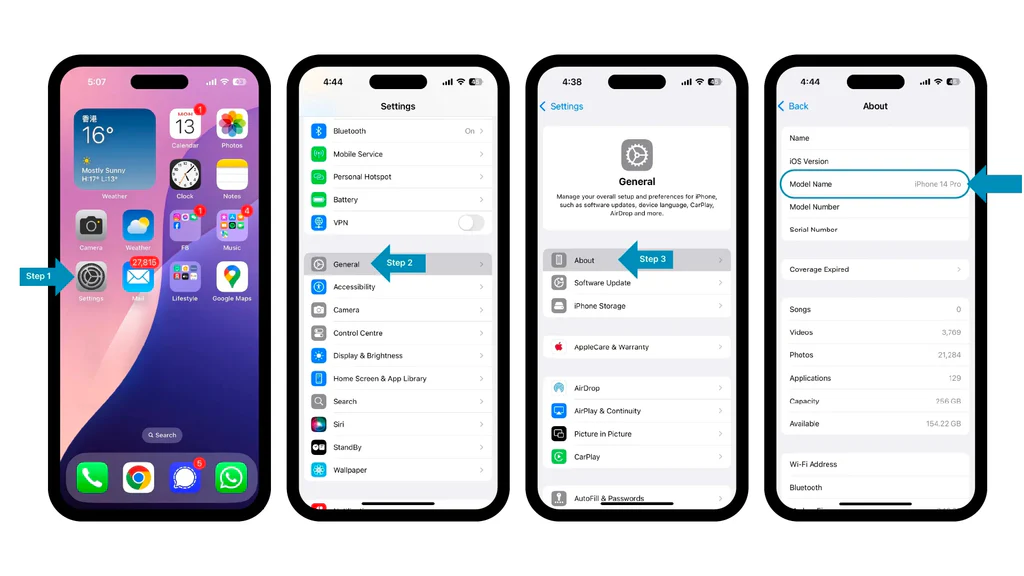
The simplest and most reliable method to answer how do I know what iPhone I have is through the built-in Settings app. This works on all modern iPhones running recent iOS versions.
Step-by-Step Instructions:
- Open the Settings app on your iPhone.
- Scroll down and tap General.
- Tap About.
- Look for Model Name (e.g., “iPhone 17”) near the top. This displays the friendly name directly.
- For the full model number (starting with “A”), tap the Model Number field. It toggles between part number and model number.
This displays details like serial number, iOS version, and storage capacity too.
Practical Example: If it shows “iPhone 17e,” you know it’s the 2026 budget-friendly model with a single rear camera and 6.1-inch display.
Decoding iPhone Model Numbers
Model numbers provide precise identification, including regional variants. They look like Axxxx (e.g., A3575).
Understanding the Format
- The “A” prefix is standard.
- Regional differences exist (e.g., US models often lack a physical SIM tray due to eSIM-only design).
- The first letter after tapping in Settings can indicate if it’s new (M), refurbished (F), or replacement (N).
Here’s a quick reference table for popular 2025–2026 models:
| Model | Year | Key Model Numbers | Display Size | Notable Features |
|---|---|---|---|---|
| iPhone 17e | 2026 | A3575, A3634, A3635 | 6.1″ | Single camera, affordable option |
| iPhone 17 | 2025 | A3258, A3520 etc. | 6.3″ | Dual cameras, Dynamic Island |
| iPhone Air | 2025 | A3260, A3517 etc. | 6.5″ | Slim design, titanium elements |
| iPhone 17 Pro | 2025 | A3256, A3523 etc. | 6.3″ | Triple cameras, ProMotion |
| iPhone 17 Pro Max | 2025 | A3257, A3526 etc. | 6.9″ | Largest screen, advanced LiDAR |
| iPhone 16 series | 2024 | Various A3xxx | 6.1–6.9″ | Camera Control button |
For a complete list, visit Apple’s official iPhone model identification page.
Physical Features to Identify Your iPhone
If your iPhone won’t turn on or you prefer a hands-on approach, examine its exterior.
Key Design Clues:
- Camera Setup: Single lens (budget models like 17e), dual vertical (standard), or triple with LiDAR (Pro models).
- Buttons: Action Button on the left (newer models), Camera Control on the right (16 series onward).
- Edges and Materials: Flat edges (post-12), rounded (older), titanium vs. aluminum frames.
- SIM Tray: Location and presence vary by region and model.
- Back Glass: Matte texture, colors, or engraved model number on very old devices.
Beginner-Friendly Tip: Compare your phone side-by-side with images from trusted sources. For instance, the iPhone Air’s ultra-slim profile stands out distinctly.
Using a Computer to Identify Your iPhone
Connect your iPhone to a Mac or PC for another verification method.
On macOS (Finder):
- Connect via USB-C.
- Open Finder and select your iPhone.
- Click the General tab for model info.
On Windows (iTunes or Apple Devices app):
Similar steps yield the model name and number.
This is useful for older devices or bulk identification.
Checking Serial Number and Warranty Status
Your serial number reveals manufacturing details and warranty info.
- In Settings > General > About, copy the Serial Number.
- Visit Apple’s Check Coverage page and enter it.
This confirms purchase date, support eligibility, and helps verify authenticity when buying used.
Actionable Advice: Combine serial lookup with model number for complete verification, especially on marketplaces like eBay or local classifieds.
iPhone Model Comparison: Key Differences in 2026
Understanding differences aids decision-making for upgrades or accessories.
Benefits of Newer Models (17 series):
- Superior cameras and processing power.
- Longer software support (up to 6+ years).
- Features like advanced Dynamic Island and better battery life.
Drawbacks:
- Higher cost.
- Overkill for basic users (email, browsing, calls).
Older models like iPhone 13 or 14 remain capable for many, offering great value on the used market. Compare specs on Apple’s comparison tool.
Common Scenarios and Troubleshooting
- Bought Second-Hand: Ask the seller for the model number or use the Settings method immediately.
- Inherited Device: Check for engraving on the back (pre-iPhone 8) or use Settings.
- Won’t Power On: Look for physical markers or connect to a computer.
- Multiple Devices: Label them or note in your Apple ID account.
Expert Tip: Take a screenshot of the About page for quick reference during support calls.
Why Model Identification Helps with Maintenance and Upgrades
Identifying your model informs battery health checks (Settings > Battery > Battery Health), iOS update eligibility, and compatible repairs. For instance, Pro models have more advanced repair processes due to titanium builds.
Staying informed prevents buying incompatible accessories and maximizes your device’s lifespan.
Additional Tips for iPhone Owners in 2026
- Update iOS Regularly: Ensures security and features.
- Backup Data: Use iCloud before any major changes.
- Trade-In Value: Newer identified models fetch more.
- Accessories: Match cases precisely to camera bumps and button placements.
For community discussions, check forums like Reddit’s r/iphone.
Conclusion
Figuring out how do I know what iPhone I have doesn’t require technical expertise. Whether using the quick Settings method, decoding model numbers, or examining physical features, these approaches empower you to understand your device fully. In 2026, with models ranging from the accessible iPhone 17e to powerhouse Pro variants, accurate identification supports better usage, maintenance, and upgrade decisions.
Take action today: Open Settings > General > About and note your details. Share this guide with friends or family who might be wondering the same. Armed with this knowledge, you’ll navigate the Apple ecosystem confidently for years to come.
Additional Resources:
- Wikipedia List of iPhone Models for historical context.
- Forbes Apple Coverage for reviews and buying guides.
- Amazon iPhone Accessories filtered by model.
Related posts:
![newborn baby clothes]()
How to Choose the Best Newborn Baby Clothes:
![facebook video downloader facebook video downloader]()
How to Change Name on Facebook: The Complete 2026 Guide
![Fix Orange Discoloration on MacBook Pro Screen]()
How to Fix Orange Discoloration on MacBook Pro Screen: Complete Guide to Causes & Solutions
![FIFA Club World Cup]()
Top 10 Biggest Mistakes Teams Make in the FIFA Club World Cup
![Why Does Google Deindex Website Pages and How Can You Get Them Reindexed]()
Why Does Google Deindex Website Pages and How Can You Get Them Reindexed?
![Google Gemini in 2026]()
What Is Everything You Need to Know About Google Gemini in 2026?
![fbi warns iphone android scams]()
Why the FBI Warns iPhone Android Scams Are Increasing
![What Should You Know About the iPhone 17 in 2026]()
What Should You Know About the iPhone 17 in 2026, Including Features, Specs, Price, Release Date, an...