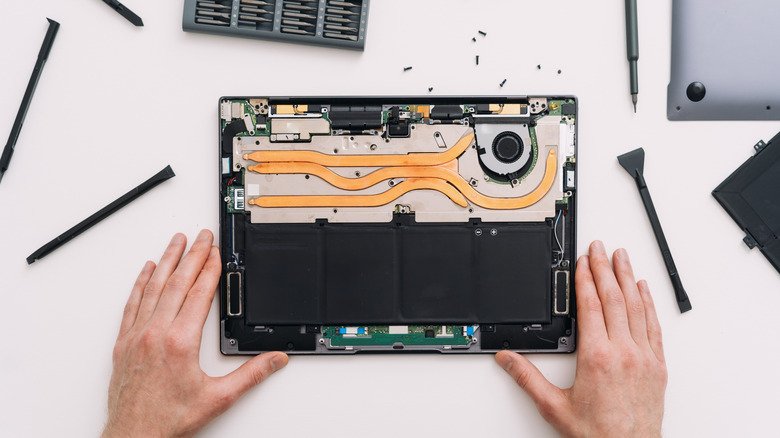
Unplugging your laptop or phone before opening it up feels like the obvious first safety step — and it genuinely isn’t enough on its own. A specific, commonly overlooked mistake around internal batteries destroys more DIY repairs than almost any other single error, and understanding it properly connects directly to our broader repair-versus-replace decision guide, since a destroyed device from this mistake often turns a cheap repair into a full replacement.
Why Unplugging the Charger Genuinely Isn’t the Whole Story
A phone or laptop’s internal battery keeps supplying power to exposed components even after the charging cable is disconnected, since the device was never actually relying on the charger alone in the first place. This is precisely the gap that catches DIY repairers off guard.
The Mistake: Skipping the Internal Battery Disconnection
Before opening a device to replace a screen, keyboard, or any internal component, the internal battery connector — not just the charging cable — genuinely needs to be disconnected first. Skipping this step means exposed components remain electrically live throughout the repair, creating real risk of short circuits and permanent component damage.
How to Actually Find and Disconnect a Battery Connector Safely
- Search specifically for a reputable repair guide matching your exact device model — battery location and connector type genuinely vary considerably between models
- Use an anti-static wristband to ground yourself before touching any internal components
- Locate the battery connector cable specifically, which is often separate from the battery casing itself
- Disconnect the connector cable gently using a plastic spudger, never metal tools
- Only proceed with the rest of the repair once the connector is genuinely, fully disconnected
Why This Step Matters Even More for Battery Replacement Specifically
If the actual repair goal is replacing the battery itself, disconnect the connector cable first regardless — this genuinely applies in every scenario, not just repairs involving other components, since the battery remains a live power source until its own connector is separated.
Devices Where This Mistake Genuinely Causes the Most Damage
- MacBooks and similar laptops where the battery sits hidden behind other components
- Modern smartphones with tightly packed internal layouts and adhesive-mounted batteries
- Any device where the battery connector isn’t immediately visible upon opening the case
What Genuine Damage This Mistake Actually Causes
Skipping proper battery disconnection can genuinely short-circuit the motherboard, permanently damage the battery itself, or fry other exposed components — turning what should have been an affordable, straightforward repair into a total device loss.
Why Reputable, Model-Specific Guides Genuinely Matter Here
Battery location and connector type differ meaningfully between manufacturers and even between different model years of the same device line. Searching for a guide specific to your exact model, rather than a generic tutorial, genuinely prevents this mistake from happening in the first place.
A Genuine Pre-Repair Safety Checklist
- Unplug the charging cable completely
- Power the device fully off, not just to sleep or standby
- Locate and disconnect the internal battery connector specifically
- Ground yourself with an anti-static wristband before touching internal components
- Confirm the battery connector is genuinely, fully disconnected before proceeding further
What to Do If You’ve Already Made This Mistake
If a device shows no signs of life after a repair attempt where the battery wasn’t properly disconnected, professional diagnostic assessment is genuinely worth pursuing before assuming the device is a total loss — some damage is repairable at the component level even when it looks catastrophic to an untrained eye.
What to Actually Do Before Your Next Repair
Search for a reputable, model-specific repair guide before opening any device, and treat internal battery disconnection as a mandatory step regardless of which specific component you’re actually repairing. For more on when a repair is genuinely worth attempting versus when replacement makes more sense, browse our Tips & Maintenance section.
Why Even Experienced Repairers Sometimes Skip This Step
Ironically, people with genuine prior repair experience sometimes skip battery disconnection specifically because a previous repair went fine without it — a survivorship-bias trap, since the actual risk depends on which specific components happen to be exposed and contacted during that particular repair, not a guarantee that skipping the step is generally safe.
Tools That Genuinely Make This Step Easier
- A proper plastic spudger kit, avoiding metal tools near any battery connector
- An anti-static wristband, genuinely inexpensive and widely available
- A well-lit magnifying work area, since battery connectors are often small and easy to damage if handled roughly
- Model-specific repair guides with genuine photos showing exact connector locations
Why Adhesive-Mounted Batteries Add Genuine Extra Risk
Many modern phones use adhesive to secure the battery in place rather than a simple removable tray, meaning genuine care is needed not just to disconnect the connector but to avoid puncturing or bending the battery itself during removal — a punctured lithium battery creates genuine fire risk beyond simple repair failure.
When to Genuinely Stop and Call a Professional Instead
If a battery appears swollen, the connector looks damaged or corroded, or you’re not confident identifying the correct connector on your specific model, stopping and consulting a professional repair service is genuinely the safer choice over proceeding uncertain.’
Why Documenting Your Repair Process Genuinely Helps
Taking photos at each step before disconnecting anything genuinely helps if you need to reassemble the device later or seek help troubleshooting an issue that arose mid-repair — a simple habit that costs nothing and often saves considerable frustration.
Frequently Asked Questions
Is unplugging the charger enough before opening my laptop?
No — the internal battery connector needs to be disconnected separately, since the battery itself continues supplying power regardless of the charger’s connection status.
Can this mistake genuinely destroy a phone completely?
Yes — skipping proper battery disconnection can short-circuit internal components, turning an otherwise affordable repair into a total device loss.
Do all devices have an easily accessible battery connector?
No — some devices, particularly certain MacBook models, hide the battery behind other components, making a model-specific guide genuinely essential before attempting any repair.
The Bottom Line
Properly disconnecting a device’s internal battery connector, not just unplugging the charger, is the genuine safety step that separates a successful DIY repair from an expensive, avoidable mistake. Following a model-specific guide and taking this step seriously protects your device regardless of which specific repair you’re actually attempting.