Most “my computer is slow and weird” complaints trace back to two genuinely boring causes: a pending update and a machine that hasn’t actually restarted in weeks. Here’s the real monthly routine worth following — and just as importantly, the popular “fixes” worth actively avoiding.
The Monthly Routine That Actually Matters
Install Windows updates monthly and follow that with a genuine Restart, not just a Shut Down — according to Rubab’s Digital’s 2026 maintenance guide, Windows’ Fast Startup feature means a standard shutdown doesn’t fully reset the system the way an actual restart does. Updating your handful of core apps and your browser matters too, since nearly everything else in Windows 11 self-updates automatically now.
- 100% free
- Call direct
- Voice search
- Urdu & English
Why Registry Cleaners and “PC Optimizers” Are a Trap
Registry cleaners solve a problem that hasn’t meaningfully existed since Windows XP, and no reputable engineer actually recommends them — at best they do nothing, at worst they break working software. “PC optimizer” suites are frequently the exact problem they claim to fix: background processes that nag, upsell, and quietly consume resources rather than freeing them up.
Driver-Updater Tools Are Genuinely Worse
Third-party driver-updater utilities are a common vector for bundled junk software, and the correct source for drivers is either Windows Update directly, or the manufacturer’s own site (Nvidia, AMD, or Intel for graphics cards specifically) — never a third-party “universal driver update” tool promising to fix everything at once.
What to Actually Do Quarterly
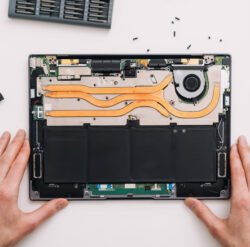
Beyond the monthly routine, a quarterly check should cover two things: confirming your backups are actually current and restorable (not just scheduled), and physically dusting the vents and fans on both laptops and desktop towers — dust buildup is a genuinely common, preventable cause of overheating and unexpected shutdowns.
The One Legitimate Cleanup Tool Exception
Not every cleanup tool deserves the same skepticism — a well-known, official-source tool like BleachBit is a reasonable exception for technically confident users who specifically want to clear temporary files and caches, provided it’s downloaded directly from the developer’s own site rather than a bundled installer from a third-party download portal.
Never Do This: Task Manager and System Folders
Ending unfamiliar processes in Task Manager, or deleting folders near System32 based on advice from an anonymous forum post, is a genuinely common way to destabilize an otherwise healthy system. Broader hardware maintenance advice from Tech TopicSolutions’ 2026 hardware guide echoes this same caution — the guide specifically recommends cleaning dust from vents every three to six months and keeping firmware and drivers current, without ever suggesting manual system-file deletion as a fix for anything.
A Simple Way to Decide What’s Worth Doing
If a maintenance task takes under ten minutes and comes recommended by the manufacturer or Microsoft directly (updates, restarts, dust removal), it’s almost always worth doing. If a tool promises to “optimize,” “boost,” or “clean” your registry with one click, that’s the specific pattern worth being skeptical of. This same principle — trust the manufacturer’s own guidance over third-party “magic fix” tools — is exactly what we’ve covered in how to fix common air conditioning problems before calling a repair technician, where the same DIY-versus-trap distinction applies to an entirely different category of home maintenance.
Building This Into an Actual Habit
Rather than remembering a long list, tying updates and restarts to a fixed day each month — the first Sunday, for example — turns this into an automatic habit rather than something you only remember once a machine already feels sluggish. This connects to [CLIENT LINK PLACEHOLDER] the same proactive maintenance mindset we’ve recommended across other device categories, where a small, consistent routine consistently beats reactive troubleshooting after something’s already gone wrong.
Frequently Asked Questions
Is it bad to leave my computer on all the time instead of restarting it?
Yes, over time — with Fast Startup enabled, a laptop or desktop that’s only ever put to sleep or shut down (not genuinely restarted) can accumulate memory issues and pending updates that a real restart would clear.
Are driver-updater apps ever safe to use?
Generally no for third-party “universal” driver tools — the safer path is Windows Update for most drivers, or the specific manufacturer’s own site (Nvidia, AMD, Intel) for graphics card drivers specifically.
The Bottom Line
A healthy PC in 2026 needs less babysitting than machines from the 2000s did, but the short monthly routine — updates, a real restart, dust removal, and steering clear of registry cleaners and driver-updater tools — remains the actual discipline that keeps a computer fast and out of the repair shop.