When a customer walks into a repair shop with a cracked screen or a phone that refuses to charge, the technician’s skill is the first thing that comes to mind. But behind every successful repair lies something equally important: the phone repair tools used to get the job done.
Smartphones today are marvels of miniaturization. They’re held together by tiny screws, sealed with industrial-strength adhesive, and packed with fragile components that can be damaged by the wrong tool or a careless move. As one industry expert puts it, “Your tools are the foundation of every repair you do”. Whether you’re just starting out or running a busy repair shop, having the right equipment isn’t a luxury—it’s a necessity. This guide covers the ten essential tools and toolkits that every technician should have in their arsenal, complete with practical advice, brand recommendations, and actionable tips.
The Foundation of Every Repair: A High-Quality Precision Screwdriver Set
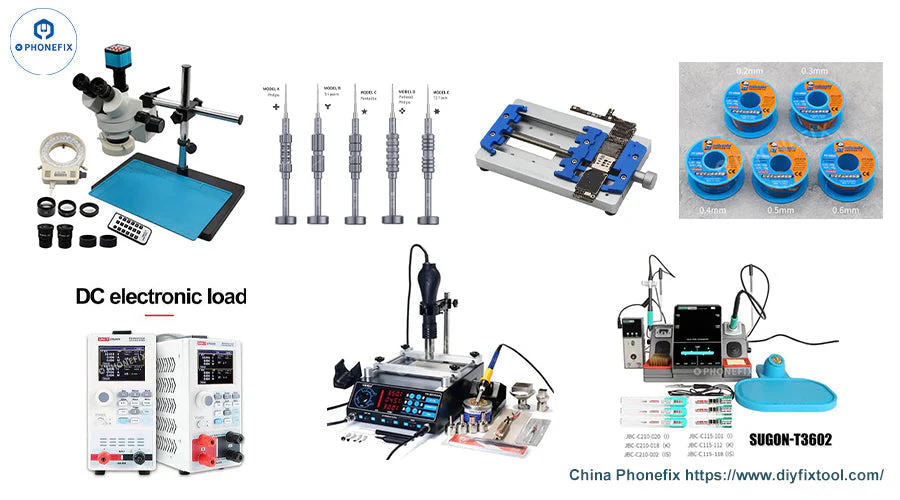
Let’s start with the tool you’ll reach for the most: the precision screwdriver set. Smartphones use an incredible variety of tiny screws—Phillips, Pentalobe, Torx, Tri‑point—and standard household screwdrivers simply won’t work. Using the wrong screwdriver can strip screw heads, damage internal components, or even make a device impossible to reassemble.
A professional-grade screwdriver set should include multiple bits (typically 20 to over 100) made from strong materials like S2 steel or chrome‑vanadium (CR‑V) steel. According to experienced technicians, “A poor-quality Torx T2 bit can wear out after just 10-15 repairs. The problem isn’t the $10 you lost on the bad toolkit—it’s the $1,000 phone you destroy when that cheap bit strips a microscopic screw”.
Key Features to Look For
-
Magnetic tips: Tiny screws can easily fall and get lost inside a device. Magnetic tips hold them securely.
-
Ergonomic handles: Repairs often involve dozens of screws. A comfortable, anti‑slip handle reduces fatigue.
-
Interchangeable bit system: A driver with a rotating cap allows one‑handed operation for better control.
-
ESD‑safe construction: Some premium kits include antistatic materials to protect sensitive electronics.
Recommended Sets
For professionals, the iFixit Pro Tech Toolkit remains the gold standard. It includes 64 precision bits made from S2 steel, a magnetic driver, and a lifetime warranty. For budget‑conscious beginners, the Kaisi 136-in-1 Set offers excellent value with a wide range of bits and durable tools. Electric precision screwdrivers are also gaining popularity for high‑frequency repairs, as they improve efficiency and reduce manual fatigue.
Real‑World Scenario
Imagine you’re replacing an iPhone screen. You need to remove two Pentalobe screws from the bottom edge, then several Phillips and Tri‑point screws inside. Without a proper precision set, you’d be stuck before you even begin. With a quality kit, you can confidently disassemble the entire phone in minutes.
Precision Spudgers and Pry Tools – For Safe, Damage‑Free Opening
Once the screws are out, you need to open the phone. Modern devices are sealed with strong adhesive to ensure water resistance. Prying them open with metal tools—or worse, kitchen knives—is a recipe for disaster.
Spudgers and pry tools are designed specifically for this task. They come in plastic (nylon), metal, and sometimes ceramic, and are used to gently separate the screen from the frame, disconnect ribbon cables, and lift out components. Non‑conductive plastic spudgers are particularly safe because they won’t short out the logic board.
Types of Pry Tools
| Tool Type | Best For |
|---|---|
| Plastic opening picks | Slicing through adhesive around the edges |
| Nylon spudgers | Disconnecting delicate flex cables |
| Metal spudgers | Stubborn adhesive (use with caution) |
| iFixit Anti‑Clamp | Applying even suction and leverage on glued screens |
The iFixit Prying and Opening Tool Assortment includes seven precision plastic tools, including spudgers, opening picks, and plastic cards, all designed for safe, damage‑free disassembly. For professionals, the Spudger Pro Ultra offers 5x more prying power for dealing with the toughest adhesives.
Expert Tip
Always apply heat before prying. “Using force to get a screen, battery, or glass back out while the glue is still cool is a quick path to broken glass and bent parts,” warns iFixit. Heat softens the adhesive, allowing the tools to do their job without excessive pressure.
ESD‑Safe Tweezers – Handling Tiny Components Without Static Damage
The inside of a smartphone is a miniature jungle of connectors, ribbon cables, and micro‑screws. Your fingers are too big and clumsy for this world—that’s where tweezers come in.
But not just any tweezers. ESD‑safe (electrostatic discharge safe) tweezers are coated with an antistatic material that prevents static electricity from damaging sensitive chips and boards. A single invisible zap from your fingertip can fry a critical component, turning a simple repair into a costly disaster.
What to Look For
-
Straight tips: For general handling of screws and small parts.
-
Curved tips: To reach around corners or into dense areas.
-
Anti‑static coating: Essential for motherboard and IC work.
-
Non‑magnetic stainless steel: Prevents components from being magnetized and sticking together.
A set of ESD‑safe tweezers is a small investment that pays off every time you work on a logic board. Many professional toolkits include tweezers with multiple tip styles, from sharp points for delicate work to blunt ends for applying gentle pressure.
Anti‑Static Mat and Wrist Strap – Protecting Your Workspace
You’ve probably experienced static electricity: the sudden shock when you touch a metal doorknob after walking on carpet. Now imagine that same discharge hitting an iPhone’s motherboard. The result can be instant, irreversible damage.
Anti‑static protection is non‑negotiable for any serious repair technician. An anti‑static mat provides a grounded surface that dissipates static charge, while a wrist strap keeps your own body static‑free. Together, they form a safe working environment for all your repairs.
Practical Use
Place the mat on your workbench and connect it to a ground point (usually a metal screw on an outlet cover or a dedicated grounding plug). Wear the wrist strap so it contacts your skin, and clip its ground wire to the mat. Within 0.1 seconds, the strap safely removes static electricity from your body.
Additional Benefits
These mats are also heat‑resistant and easy to clean. They protect your desk from solder splashes, flux, and isopropyl alcohol, making them a smart addition even beyond static protection.
Digital Multimeter – Diagnosing Electrical Faults
Not all phone problems are visible. Sometimes a device won’t charge, or the battery drains too fast, or the screen flickers. Before you start replacing parts, you need to know what’s actually broken. That’s where a digital multimeter comes in.
A multimeter measures voltage, current, resistance, and continuity. It helps you test batteries, check charging circuits, find short circuits, and verify that components are receiving power. As one guide notes, “A multimeter is an important tool for diagnosing electronic problems. It can accurately measure voltage, current, and resistance, helping you quickly identify faulty components”.
Features to Consider
-
Auto‑ranging: Automatically selects the correct measurement range.
-
Backlit display: Essential for working in dimly lit areas.
-
Continuity beeper: Audible alert when a circuit is complete (or shorted).
-
Capacitance and diode testing: Useful for checking capacitors and LEDs.
For professionals, Fluke multimeters are widely considered the best in the industry, offering wireless connectivity and smartphone integration for remote monitoring. For beginners and small shops, affordable models from UT61 series or AstroAI provide excellent performance at a fraction of the cost.
Real‑World Application
A customer brings in an Android phone that won’t charge. You measure the charging port’s voltage pins and find no power. You then check continuity between the port and the motherboard—nothing. Diagnosis: a broken charging port flex cable. You replace the cable, and the phone charges perfectly. Without the multimeter, you might have wasted time replacing the battery or the port unnecessarily.
Hot Air Rework Station – Component‑Level Repairs
When you move beyond basic screen and battery swaps and start working on motherboards, a hot air rework station becomes essential. Modern phones use surface‑mounted devices (SMDs)—tiny components soldered directly onto the circuit board. Removing or replacing them with a standard soldering iron is nearly impossible.
A hot air station blows controlled hot air through a small nozzle, melting the solder evenly without applying physical force. This allows you to remove ICs, replace charging ports, reflow solder joints, and repair broken connectors. “Unlike a basic heat gun, a hot air rework station is designed for precision work. It allows you to adjust the temperature and air pressure according to the size of the component”.
Choosing the Right Station
-
Digital temperature control: Accurate settings from 100°C to 500°C.
-
Adjustable airflow: Gentle enough for small parts, strong enough for larger ICs.
-
Interchangeable nozzles: Different sizes for different components.
-
Two‑in‑one models: Combine a hot air gun with a soldering iron for maximum versatility.
For beginners, a 2‑in‑1 soldering and rework station (such as the Yihua 8586D or Gordak 952D+) offers excellent value and a gentle learning curve. For professionals, the ATTEN ST‑862D provides precise digital control and robust build quality.
Important Safety Note
Never use a standard heat gun for motherboard work. A heat gun is too large, too powerful, and too imprecise. It can easily overheat the board, blow away tiny components, or melt plastic connectors. A dedicated hot air rework station gives you the control you need to work safely.
Heating Pad or iOpener – Softening Adhesive Without Risk
Before you can pry open a phone, you need to soften the adhesive that seals it shut. While a heat gun can work, a heating pad is far safer and more consistent.
Heating pads provide even, controlled heat across the entire device. Unlike heat guns, they don’t blow hot air directly onto components, which helps prevent localized overheating and accidental damage. They are ideal for opening screens, removing back glass, and loosening battery adhesive.
Pros and Cons of Heating Pads vs. Heat Guns
| Feature | Heating Pad | Heat Gun |
|---|---|---|
| Heat distribution | Even across the whole device | Localized, spot‑heating |
| Risk of damage | Low | High (if misused) |
| Best for | Whole‑screen/back removal | Small components (earpiece, vibrator) |
| Learning curve | Beginner‑friendly | Requires experience |
A professional heating pad, such as the TBK‑568A or CPB Heating Pad, offers precise digital temperature control (typically 0°C–120°C) and a large flexible silicone surface. For occasional repairs, the iFixit iOpener is a microwaveable heat pad that works surprisingly well and costs much less.
Step‑by‑Step Usage
-
Power off the device and remove the SIM tray.
-
Set the heating pad to 70°C–90°C (smartphones) or up to 120°C (tablets).
-
Place the phone screen‑side down on the pad for 5–10 minutes.
-
Use a suction cup and plastic picks to gently lift the screen.
-
Reapply heat if the adhesive resists.
Magnetic Project Mat – Never Lose a Screw Again
One of the most frustrating experiences in phone repair is losing a tiny screw—or worse, putting the wrong screw in the wrong hole and puncturing a component inside the device.
A magnetic project mat solves both problems. These silicone mats have a magnetic surface that holds screws and small parts in place, preventing them from rolling away or getting knocked off the table. Many also include printed labels or compartments where you can draw or write the exact location of each screw, so you know exactly where everything goes when it’s time to reassemble.
Why It’s a Game‑Changer
“Assuming that the screws will stay in place on a nearby flat surface” and “assuming that there are only a couple lengths or widths of screws in the device” are two of the biggest mistakes beginners make. A magnetic mat eliminates both issues. You can stick screws directly onto the mat in the pattern they came from the device, then refer to your photo or diagram for reassembly.
For high‑volume repair shops, a magnetic screw mat with labeled sections can save hours of frustration and prevent costly mistakes. Some premium kits, like the STREBITO 142‑Piece Precision Set, include a magnetic mat as part of the package.
Soldering Iron – Basic Rework and Wire Repairs
While a hot air station handles most SMD work, a traditional soldering iron is still essential for many tasks: reattaching loose wires, replacing damaged connectors, repairing broken charging ports, and fixing torn flex cables.
A good soldering iron for phone repair should have:
-
Temperature control (adjustable from 200°C to 450°C)
-
Interchangeable fine tips (e.g., 0.5mm conical or chisel tips)
-
Quick heat‑up time (30 seconds or less)
-
ESD‑safe construction
For professional work, a micro‑soldering station with a fine tip and stable temperature regulation is ideal. Many two‑in‑one stations combine a soldering iron with a hot air gun, saving bench space and money.
Essential Accessories
-
Solder wire (thin, 0.5–0.8mm, with flux core)
-
Liquid flux (improves solder flow and prevents bridging)
-
Desoldering braid (removes excess solder)
-
Solder sucker / desoldering pump (removes solder from through‑holes)
Using cheap, low‑quality solder or a poorly regulated iron can lead to cold joints, lifted pads, and damaged boards. Invest in reputable brands like Hakko, Weller, or Aifen for consistent results.
Magnification Tools (Loupe, Headset, or Microscope)
Phone components are incredibly small. A capacitor might be smaller than a grain of sand, and a broken wire can be invisible to the naked eye. For advanced board‑level repairs, magnification isn’t optional—it’s essential.
Three common options exist:
-
Magnifying lamp: A desk lamp with a built‑in magnifying glass (typically 3x–5x). Good for basic inspection and soldering.
-
Head loupe / visor: Wearable magnification (10x–20x) that leaves both hands free. Excellent for detailed work.
-
Stereo microscope: Professional‑grade magnification (20x–50x) with adjustable zoom and lighting. Essential for chip‑level repairs on motherboards.
Many technicians start with a magnifying lamp and later upgrade to a microscope as their skills advance. “A microscope helps spot broken lines or soldering issues not visible to the naked eye,” notes one repair expert.
Cleaning Supplies – Isopropyl Alcohol, Brushes, and Cloths
A clean workspace leads to cleaner repairs. The final essential category is cleaning supplies, which are often overlooked but critically important.
-
Isopropyl alcohol (90%+) : Removes old adhesive, cleans flux residue, and dries quickly without leaving residue. It’s also used to diagnose water damage and clean circuit boards.
-
Anti‑static brush: Soft bristles that won’t damage components. Perfect for sweeping away dust and debris before reassembly.
-
Microfiber cloths: Clean screens and glass back panels without scratching.
-
Adhesive remover: For stubborn glue residue after screen removal.
After soldering or reworking a PCB, always clean the area with isopropyl alcohol. This removes corrosive flux, prevents short circuits, and extends the life of the repair.
Building Your Toolkit: Where to Start and How to Upgrade
No technician needs every tool on this list from day one. The key is to start with the essentials and upgrade as your skills and workload grow.
Beginner Level (Basic Screen & Battery Swaps)
-
Precision screwdriver set (iFixit Essential or Kaisi 136‑in‑1)
-
Plastic pry tools and spudgers
-
ESD‑safe tweezers
-
Suction cup
-
Magnetic project mat
-
Isopropyl alcohol and microfiber cloth
A beginner can handle most battery replacements and screen swaps with these tools. “A good toolkit should contain tools that are easy to maintain, such as wear‑resistant screwdriver heads and easy‑to‑clean suction cups”.
Intermediate Level (Charging Ports, Cameras, Buttons)
Add to the beginner list:
-
Digital multimeter
-
Heating pad or iOpener
-
Soldering iron (basic temperature‑controlled)
-
Magnifying lamp
At this level, you can diagnose electrical faults, replace soldered‑on components like charging ports, and repair broken buttons.
Professional Level (Motherboard & Chip‑Level Repairs)
Add to the intermediate list:
-
Hot air rework station
-
Professional soldering station (micro‑soldering)
-
Stereo microscope
-
Anti‑static mat and wrist strap
-
Ultrasonic cleaner (for water‑damaged boards)
-
Power supply / DC power source
With these tools, you can tackle IC replacements, BGA rework, water damage restoration, and complex diagnostic work. “From precision screwdrivers to anti‑static equipment, screen repair tools, diagnostic software, and cleaning supplies, each category plays a unique and indispensable role”.
Setting Up Your Workspace for Efficiency
Having the right phone repair tools is only half the battle. You also need an organized, efficient workspace. A cluttered bench leads to lost screws, damaged tools, and wasted time.
Workstation Zoning
Divide your bench into distinct areas:
-
Repair area: Where the device sits. Keep your most‑used tools within arm’s reach.
-
Tool storage area: Organize screwdrivers, pry tools, tweezers, and other instruments in labeled trays or a magnetic tool bar.
-
Parts area: Store spare screens, batteries, and small components in compartmentalized boxes, labeled by phone model.
-
Testing area: A clear space for testing repaired devices with known‑good chargers, cables, and power sources.
“A clean and organized workspace improves productivity,” notes one industry guide. “You can classify your essential tools into diagnostics tools and repair equipment, making it easier for technicians to handle them”.
Lighting
Good lighting is crucial. Use a bright LED desk lamp (5000K–6500K color temperature) to reduce eye strain and reveal small details. A magnifying lamp combines light and magnification in one unit.
Common Mistakes to Avoid
Even experienced technicians can make errors. Here are the most common tool‑related mistakes and how to avoid them:
Using the Wrong Tool for the Job
“Attempting repairs without the right tools is the most prevalent mistake. Using household items like kitchen knives, regular screwdrivers, or unspecialized pry tools can strip tiny screws, scratch delicate components, or shatter glass panels”. Always use the proper tool for each task.
Buying Cheap Tools
Cheap tools are expensive in the long run. A $10 kit might seem like a bargain, but when a low‑quality bit strips a screw inside a $1,000 phone, the true cost becomes clear. Invest in quality from the start.
Ignoring ESD Protection
“Static electricity can wreak havoc on the sensitive electronic components inside your device”. Always use an anti‑static mat and wrist strap when working on motherboards or other sensitive electronics.
Losing Screws
Losing a tiny screw can end a repair. Use a magnetic mat, take photos of screw locations, and keep screws organized by their original position.
Forcing Components Open
If a screen or battery doesn’t want to come out, apply more heat—not more force. Forcing a component can crack the display, snap cables, or bend the frame.
Trusted External Resources
For further reading and research, here are several trusted external sources:
-
Wikipedia’s page on Electrostatic Discharge offers valuable background on why ESD safety matters. Available at Electrostatic discharge Wikipedia.
-
iFixit provides free, detailed repair guides for thousands of devices. Their Pro Tech Toolkit is widely considered the industry standard.
-
Amazon customer reviews are a great way to compare real‑world experiences with different repair kits. Search for iFixit Pro Tech Toolkit and Kaisi repair kit to see thousands of verified ratings.
-
Fluke Corporation is the leading manufacturer of professional multimeters. Their Fluke 3000 FC Wireless Multimeter is a top choice for advanced technicians.
-
The Right to Repair movement has extensive documentation on repair tool standards and consumer rights. Learn more at repair.org.
Conclusion
Every successful phone repair starts with the right tools. From the precision screwdriver set that opens the device to the hot air station that reworks the motherboard, each tool plays a specific and irreplaceable role.
To summarize the key takeaways:
-
Start with the basics: a quality screwdriver set, pry tools, tweezers, and a magnetic mat will handle most common repairs.
-
Invest in safety: anti‑static protection and proper magnification prevent costly mistakes.
-
Add diagnostic tools early: a multimeter saves hours of guesswork.
-
Upgrade as you grow: move from basic repairs to board‑level work by adding heat pads, soldering stations, and microscopes.
-
Keep your workspace organized: a clean, well‑lit bench improves efficiency and reduces errors.
Whether you’re fixing your own phone at home or running a busy repair shop, the tools you choose matter. Buy quality, learn to use them properly, and treat every device with the care it deserves. With the right toolkit in your hands, there’s no repair you can’t handle.
Related posts:
![Apple iPhone 17e Unlocked by RedPocket Mobile]()
Apple iPhone 17e Unlocked by RedPocket Mobile: Best Budget Deal in 2026?
![How to Reset Network Settings on iPhone: Ifixit]()
How to Reset Network Settings on iPhone: The Complete 2025 Troubleshooting Guide
![How Can You Find a Reliable Phone Repair Service Near You]()
How Can You Find a Reliable Phone Repair Service Near You?
![How to Fix Android Phone Not Charging Properly ifixit.org.uk]()
How to Fix Android Phone Not Charging Properly: 2026 Troubleshooting Guide
![How to Fix iPhone Stuck on Apple Logo Screen?]()
How to Fix iPhone Stuck on Apple Logo Screen?
![Can You Fix a Broken Screen Without Replacing the Entire Device?]()
How Can You Fix a Broken Screen Without Replacing the Entire Device?
![ifixit.org.uk]()
How to Fix Horizontal Lines on Android Phone: Ultimate Troubleshooting and Repair Guide
![how to unhide apps on iphone]()
How to Unhide Apps on iPhone: A Complete, Step-by-Step Guide