The iMac A1418 is Apple’s model number for a long-running series of 21.5-inch all-in-one desktop computers released between late 2012 and mid-2017. This identifier covers multiple generations of Intel-based iMacs, each offering a sleek aluminum design, integrated display, and solid performance for its era a2442.
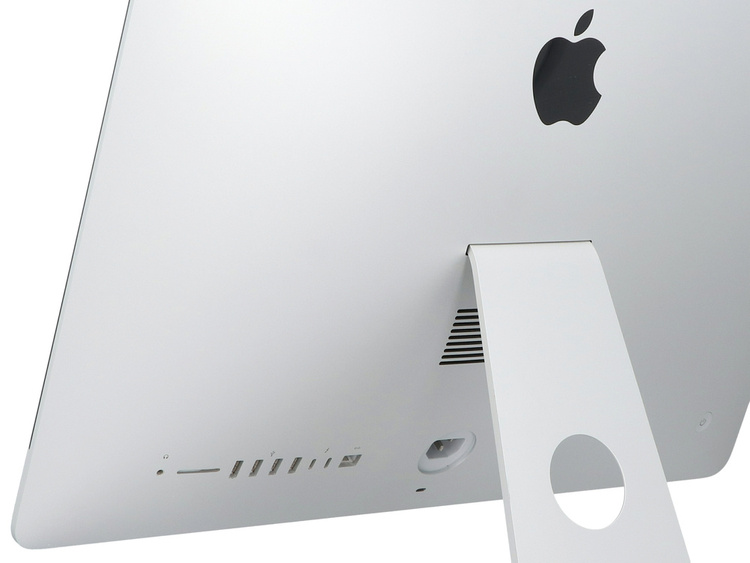
If you’ve come across an A1418 in a listing, at a garage sale, or in your office, you’re likely looking at one of Apple’s popular consumer desktops. These machines combined the computer and monitor into one elegant unit, making them ideal for home offices, students, and families. In this comprehensive guide, we’ll break down the history, specifications, upgrades, pros and cons, and real-world usability of the iMac A1418 in 2026.
History and Generations of the iMac A1418
Apple reused the A1418 model number across several years, which can cause confusion. Each variant is best identified by its EMC number (found on the bottom stand), Model Identifier (via “About This Mac”), or release year.
Key generations include:
- Late 2012 / Early 2013: Entry-level models with Ivy Bridge processors (e.g., Core i5 2.7–2.9 GHz). Non-Retina 1080p display. EMC around 2544/2545.
- Late 2013: Haswell processors, improved graphics. Still 1080p.
- Mid-2014: Slimmer design updates, dual-core options.
- Late 2015: Introduction of Broadwell chips and optional Retina 4K displays for sharper visuals.
- Mid-2017: Final and most capable A1418 models with Kaby Lake processors, better 4K options, and improved efficiency.
These iMacs marked a shift toward thinner profiles and better integration, building on the tapered aluminum unibody design that defined the Intel iMac era.
Key Specifications Across A1418 Models
Specifications vary significantly by year, so always check the exact config.
Display: Most feature a 21.5-inch LED-backlit IPS panel at 1920×1080 resolution. Later Retina 4K models (2015–2017) offer 4096×2304 resolution for stunning clarity in photo and video editing.
Processor: Ranges from dual-core to quad-core Intel Core i5/i7 CPUs across 3rd to 7th generation (Ivy Bridge to Kaby Lake). Higher-end configs deliver better multitasking and light creative workloads.
Memory: Starts at 8GB DDR3/DDR4. Early models often allow user upgrades (up to 16GB or more), while later ones have soldered RAM, limiting options.
Storage: Traditional 1TB HDDs in base models, with Fusion Drive (SSD + HDD hybrid) or pure SSD options in higher configs. Upgrading to SSD is one of the most impactful improvements.
Graphics: Integrated Intel Iris or discrete options like NVIDIA GT 650M in early models, evolving to better Iris Pro in later ones.
Ports: Typically include USB 3.0, Thunderbolt, Gigabit Ethernet, and SD card slot. Headphone jack and FaceTime HD camera round out connectivity.
Other Features: Excellent built-in speakers, quiet operation, and a VESA mount option on some models.
Identifying Your Specific A1418 iMac
To determine your exact model:
- Click the Apple menu > About This Mac.
- Note the Model Identifier (e.g., iMac14,1 or iMac18,2) and year.
- Check the EMC number on the bottom of the stand for precise identification.
- Use resources like EveryMac.com for full specs.
This step is crucial because a 2017 4K model performs far better than a 2012 base unit.
Performance and Real-World Use Cases
The iMac A1418 remains capable for many tasks in 2026:
- Everyday Computing: Web browsing, email, streaming, and office work feel smooth on mid-to-late models.
- Student and Home Use: Great for homework, video calls, and light photo editing.
- Creative Work: Retina 4K variants handle Adobe Photoshop, Lightroom, and basic video editing well, especially with upgrades.
- Limitations: Demanding modern apps or heavy 4K video timelines may struggle compared to newer Apple Silicon Macs.
Practical Example: A teacher using a Late 2015 A1418 for preparing lessons, running Zoom, and editing student photos finds it reliable after an SSD upgrade.
Upgrading Your iMac A1418: Expert Tips and Actionable Advice
Upgrades can breathe new life into these machines.
SSD Upgrade
Replacing the mechanical HDD with an SSD is the single best upgrade. Expect dramatically faster boot times, app launches, and file access. Kits with adhesive strips and tools are available. For 2017 models, external SSD booting via Thunderbolt is also viable.
Tip: Choose a reliable brand like Samsung or Crucial. Back up data first and follow detailed iFixit or YouTube guides for your specific EMC.
RAM Upgrade
Early models (2012–2013) support easy access via the bottom panel. Later ones require screen removal, which is more involved due to adhesive. Aim for 16GB+ where possible for better multitasking.
Other Enhancements
- Clean install of a supported macOS version.
- External displays or peripherals for expanded workflows.
- Monitor for dust buildup inside the chassis.
Caution: Screen removal on later models risks damage if not done carefully. Consider professional service for complex jobs.
Benefits vs. Drawbacks of the iMac A1418
Benefits:
- Beautiful, space-saving all-in-one design.
- Excellent display quality, especially Retina models.
- Reliable build quality and long-term software support for later variants.
- Affordable entry into the Mac ecosystem on the used market.
- Good for multi-monitor setups or specialized uses like sim racing rigs when paired with external hardware.
Drawbacks:
- Older Intel processors lack the efficiency of Apple Silicon.
- Limited or no RAM upgrades in post-2014 models.
- End of official macOS updates for many variants (Ventura or earlier for 2017 models).
- Potential repair challenges due to glued components.
Overall, benefits often outweigh drawbacks for budget-conscious users or those with light needs.
Buying a Used iMac A1418: What to Look For
In 2026, these are readily available on secondary markets like eBay, Amazon, or local listings.
Checklist:
- Verify no iCloud lock or Activation Lock.
- Test screen for dead pixels, backlight issues, or yellowing.
- Run Apple Diagnostics (hold D at startup).
- Check battery health (if applicable) and thermal performance.
- Confirm storage type and upgrade history.
- Prefer models with Retina display and recent processor.
Expert Advice: Budget $200–$600 depending on config and condition. Prioritize 2015+ models with 4K and SSD. Test thoroughly before purchase.
Compare to newer options: A used A1418 offers great value versus entry-level modern setups for basic tasks.
macOS Compatibility and Software Support
- Early models top out around macOS Catalina or High Sierra.
- Mid-2017 models support up to macOS Ventura.
- For security, stick to the latest supported version and use security updates. Consider OpenCore Legacy Patcher for extended support on older hardware (advanced users only).
Always back up and test compatibility with your apps.
Maintenance and Longevity Tips
To maximize lifespan:
- Keep vents clean and ensure good airflow.
- Use surge protectors.
- Update software and apps regularly.
- Monitor for failing HDDs and upgrade proactively.
- Use external storage for large media libraries.
With proper care, a well-maintained A1418 can serve reliably for years.
Comparing A1418 to Other iMacs
The A1418 (21.5-inch) is more compact and affordable than 27-inch A1419 models but offers less screen real estate. Compared to modern M-series iMacs, it lacks performance and efficiency but wins on price and familiarity for many users. It’s a solid bridge for those transitioning or needing a secondary machine.
Common Questions About iMac A1418
Is it good for gaming? Light gaming yes; modern titles, better with external GPU if possible (limited support).
Can it support multiple monitors? Yes, via Thunderbolt and HDMI adapters for a productive setup.
Worth buying in 2026? Yes, for budget, education, or secondary use—especially upgraded units.
Conclusion
The iMac A1418 represents a sweet spot in Apple’s desktop history: stylish, capable, and now very accessible on the used market. While not the powerhouse of today’s Apple Silicon machines, later generations with Retina displays and upgrades deliver excellent value for everyday productivity, creative hobbies, and home computing.
Actionable Takeaways:
- Identify your exact model using EMC or About This Mac.
- Prioritize SSD upgrades for the biggest performance boost.
- Test thoroughly when buying used.
- Match the machine to your needs—light tasks suit it perfectly.
- Consider it as an affordable, elegant Mac solution before jumping to new hardware.
By understanding the nuances of the A1418 lineup, you can make an informed decision that fits your budget and workflow. Whether restoring an old favorite or starting fresh with a used unit, this classic iMac continues to impress with its timeless design and practical capabilities. Explore trusted resources like Apple Support or community forums for more tailored advice, and enjoy the seamless experience Apple desktops are known for.
Additional External Links for Further Reading:
- Learn more about iMac history on Wikipedia’s Intel-based iMac page.
- Check current listings and reviews on Amazon for refurbished A1418 models.
- Join discussions on Reddit’s r/mac community for user experiences.
Related posts:
![facebook video downloader facebook video downloader]()
How to Change Name on Facebook: The Complete 2026 Guide
![Fix Orange Discoloration on MacBook Pro Screen]()
How to Fix Orange Discoloration on MacBook Pro Screen: Complete Guide to Causes & Solutions
![Google Gemini in 2026]()
What Is Everything You Need to Know About Google Gemini in 2026?
![fbi warns iphone android scams]()
Why the FBI Warns iPhone Android Scams Are Increasing
![What Should You Know About the iPhone 17 in 2026]()
What Should You Know About the iPhone 17 in 2026, Including Features, Specs, Price, Release Date, an...
![Best Free Password Managers ifixit]()
Best Free Password Managers: Secure Your Digital Life in 2026
![Snapchat Planets - ifixit]()
How Do Snapchat Planets Work and What Does Each Planet Mean in the Friend Solar System?
![What Causes Black Lines on Laptop Screen]()
What Causes Black Lines on Laptop Screen? A Complete Troubleshooting Guide