The Samsung Galaxy S26 Ultra stands as one of the most advanced Android flagships of 2026, boasting a stunning privacy-focused display, powerful Snapdragon 8 Elite Gen 5 processor, and integrated S Pen. Yet, for many tech enthusiasts and practical users, one question looms large: how repairable is this expensive device in the long run?
iFixit, the renowned authority on electronics repair, conducted a detailed teardown shortly after the phone’s March 2026 launch. Their findings paint a picture of a device with promising repair-friendly elements undercut by persistent design and support challenges. This article dives deep into the Samsung Galaxy S26 Ultra repairability insights from iFixit, helping you understand what it means for everyday owners.
iFixit’s Overall Repairability Score for the Galaxy S26 Ultra
iFixit awarded the Samsung Galaxy S26 Ultra a provisional 5 out of 10 repairability score. This matches the score of its predecessor, the S25 Ultra, indicating incremental rather than revolutionary progress.
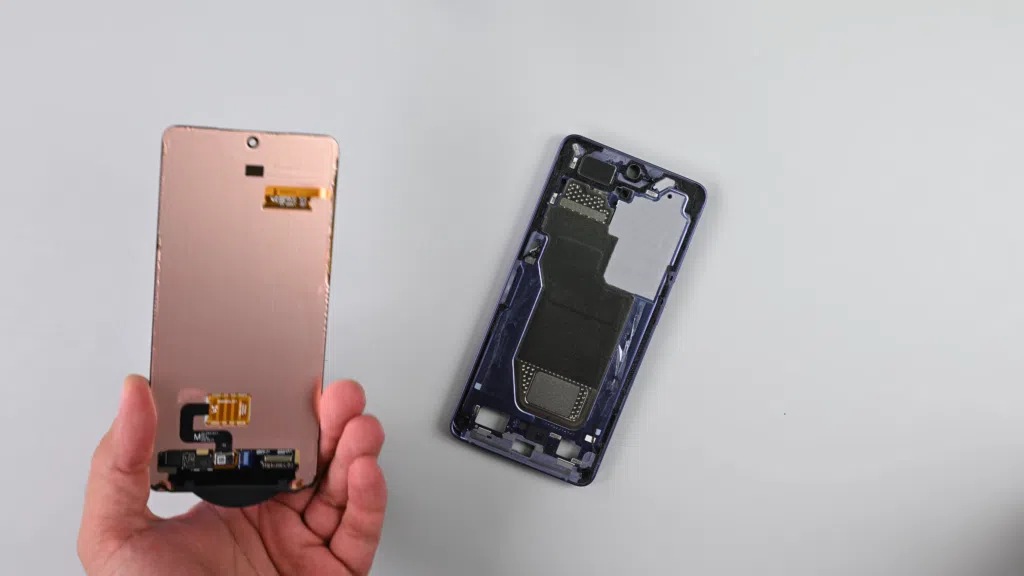
The score reflects a phone of contrasts: some components are impressively accessible, while others—particularly the most commonly damaged parts—remain frustratingly difficult to service. iFixit noted that with better official parts availability and documentation, the score could potentially rise to a 6/10, aligning it with competitors like Google’s Pixel lineup.
This middling rating matters because flagship phones like the S26 Ultra often cost well over $1,000. Repairability directly impacts the total cost of ownership, environmental footprint, and device longevity.
Key Highlights from the iFixit Teardown Process
The teardown revealed several standout features in the design:
- Easy Back Cover Removal: Standard heat application allows straightforward access to the internals without excessive force.
- Battery Design: One of the strongest positives. The battery uses a swaddle-like wrapper with multiple pull tabs, making removal significantly easier than in older Samsung models.
- Modular USB-C Port: A welcome addition that lets users replace just the charging port without major disassembly.
- Rear Camera Modularity: Individual camera modules can often be addressed more independently.
However, challenges emerged quickly, especially with the display. iFixit technicians encountered significant difficulties removing the screen, with a high risk of damage during the process. The “brilliant” privacy display, while innovative, uses heavy adhesive and complex layering that complicates repairs.
Breaking Down Component-by-Component Repairability
Battery Replacement: A Major Win
Battery degradation is one of the most common reasons users seek repairs after 2–3 years. The Galaxy S26 Ultra shines here.
The pull-tab system allows the battery to slide out with minimal prying once the back cover is removed. This design reduces the risk of puncturing the cell and makes the process accessible to intermediate DIYers with basic tools.
Real-world scenario: A user noticing reduced battery life after 18 months can potentially handle this repair at home, saving hundreds compared to official service.
Display and Front Components: The Biggest Pain Point
The display remains the Achilles’ heel for Samsung Galaxy S26 Ultra repairability.
- High likelihood of damaging the screen during removal.
- Complex adhesive and layered construction (including the privacy filter).
- Selfie camera integration adds further complications.
Screen repairs on flagships are already expensive; the design here may drive costs even higher and increase the chance of needing a full unit replacement rather than just the glass.
Cameras and Modular Elements
Rear cameras benefit from better modularity, allowing targeted replacements. However, fragile ribbon cables near the modules require careful handling. The USB-C board’s modular nature is another step forward, addressing a frequent failure point from drops or wear.
Pros and Cons of Samsung Galaxy S26 Ultra Repairability
Pros:
- Improved battery access with pull tabs.
- Modular USB-C port.
- Relatively standard back glass removal.
- Potential for easier camera maintenance.
- Seven years of software support extends usable life.
Cons:
- Display replacement is risky and complex.
- Limited official parts availability through Samsung’s channels.
- High risk of collateral damage during disassembly.
- Documentation and support for DIY repairs lag behind leaders like Fairphone or some Google models.
| Component | Repair Difficulty | Key Notes | Estimated DIY Feasibility |
|---|---|---|---|
| Battery | Low | Pull tabs make it straightforward | High |
| Back Cover | Low | Heat + pry | High |
| USB-C Port | Medium | Modular design | Medium-High |
| Rear Cameras | Medium | Fragile ribbons | Medium |
| Display/Selfie Cam | High | Heavy adhesive, high damage risk | Low (Professional recommended) |
How Does It Compare to Previous Models and Competitors?
Compared to the S25 Ultra, the S26 shows continuity rather than major leaps. Battery improvements carry over, but screen challenges persist.
Against competitors:
- Google’s Pixel series often scores higher due to better parts ecosystems.
- Apple’s iPhone models frequently feature stronger official repair programs but can be more sealed overall.
- True repairability champions like the Fairphone emphasize user-serviceable designs from the ground up.
Samsung has made gestures toward sustainability, but critics argue the company stops short of full commitment.
Practical Tips for Galaxy S26 Ultra Owners
- Preventive Care: Use a high-quality case and screen protector to minimize drop and scratch damage—the two most common repair triggers.
- Battery Health Management: Enable optimized charging features and avoid extreme temperatures to slow degradation.
- DIY Considerations: For battery or port repairs, gather proper tools (heat gun, spudgers, suction cups) and follow iFixit guides closely. Beginners should watch full teardown videos first.
- Professional Service: For display issues, visit authorized Samsung centers. Check warranty status, as DIY attempts may void coverage.
- Parts Sourcing: Monitor Samsung’s official parts program. Third-party options exist but quality varies—prioritize reputable suppliers for critical components like the display.
Expert Tip: Document your disassembly with photos if attempting repairs. This helps during reassembly and can support warranty claims if issues arise later.
Environmental and Longevity Implications
Better repairability reduces electronic waste. With the S26 Ultra’s seven-year update promise, a truly serviceable device could last 5–7 years or more, aligning with growing consumer demand for sustainable tech.
However, the current 5/10 score suggests many units may end up recycled prematurely due to costly screen repairs. Owners who prioritize longevity should factor repair costs into their purchase decision.
Common Repair Scenarios and Cost Considerations
- Battery Replacement: Potentially $50–150 DIY vs. higher at service centers.
- Screen Repair: Often $300–500+, depending on region and whether full assembly is needed.
- Camera Lens/Minor Issues: More affordable and accessible.
Real-world example: A user who drops their phone and cracks the screen faces a hefty bill, while one with battery issues might resolve it affordably.
Future Outlook for Samsung Repairability
iFixit and industry observers hope Samsung will expand its parts program and simplify high-failure-point repairs. Regulatory pressures in Europe and growing consumer awareness could drive improvements in future models.
For now, the Galaxy S26 Ultra offers a mixed bag—excellent in some areas, frustrating in others.
Conclusion
The iFixit teardown highlights that while the Samsung Galaxy S26 Ultra incorporates several repair-friendly innovations like an accessible battery and modular port, overall Samsung Galaxy S26 Ultra repairability remains average at best with its 5/10 score. The brilliant display comes at the cost of difficult and risky replacement, a common theme in premium smartphones.
For potential buyers, this means weighing the phone’s cutting-edge features against long-term maintenance realities. If you take excellent care of your device, opt for protective accessories, and use authorized service when needed, the S26 Ultra can deliver years of reliable performance.
Actionable Takeaways:
- Prioritize battery and software management to extend life.
- Consider repair costs in your total ownership budget.
- Support manufacturers who improve parts availability and design accessibility.
- For DIY enthusiasts, start small with simpler components and always use quality guides.
By staying informed about these repair insights, you can make smarter decisions that maximize value and minimize frustration with your Samsung Galaxy S26 Ultra.
External resources for further reading: Learn more about general smartphone repair trends on Wikipedia’s Right to Repair page. Check community discussions on Reddit’s r/Android forum for user experiences with Galaxy repairs. Explore professional repair options and tools at trusted retailers like Amazon.
Related posts:
![facebook video downloader facebook video downloader]()
How to Change Name on Facebook: The Complete 2026 Guide
![Fix Orange Discoloration on MacBook Pro Screen]()
How to Fix Orange Discoloration on MacBook Pro Screen: Complete Guide to Causes & Solutions
![Google Gemini in 2026]()
What Is Everything You Need to Know About Google Gemini in 2026?
![fbi warns iphone android scams]()
Why the FBI Warns iPhone Android Scams Are Increasing
![What Should You Know About the iPhone 17 in 2026]()
What Should You Know About the iPhone 17 in 2026, Including Features, Specs, Price, Release Date, an...
![Best Free Password Managers ifixit]()
Best Free Password Managers: Secure Your Digital Life in 2026
![Snapchat Planets - ifixit]()
How Do Snapchat Planets Work and What Does Each Planet Mean in the Friend Solar System?
![What Causes Black Lines on Laptop Screen]()
What Causes Black Lines on Laptop Screen? A Complete Troubleshooting Guide